


You open an Excel file and the problems start immediately. Customer names in three different formats. Phone numbers with missing country codes. Hundreds of duplicate rows. Date columns where some cells say 01/05/2024 and others say May 1, 2024. Empty rows scattered throughout. And somewhere buried in all of this – the actual data you need to work with.
This is dirty data. Every business has it. HR teams deal with it in employee records. Accountants face it in transaction exports. Sales teams inherit it from CRM downloads. Back-office staff encounter it every time a new vendor sends a report.
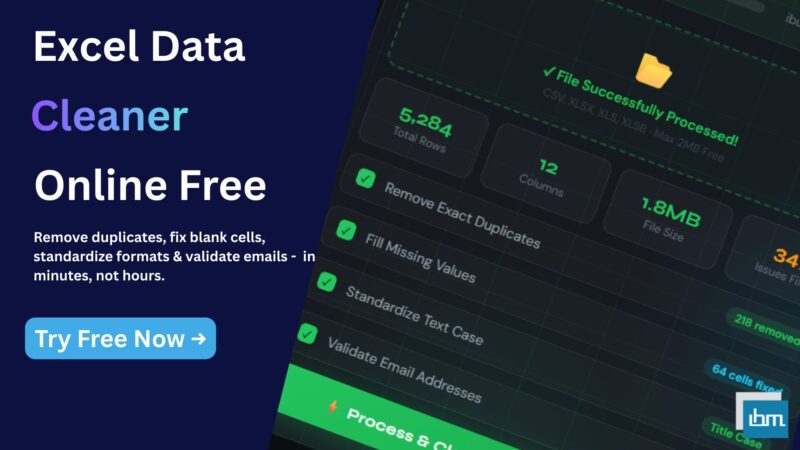
The traditional solution – cleaning manually inside Excel using formulas, Find & Replace, and Remove Duplicates – works, but it takes hours. Hours that professionals simply do not have. Our free Excel Data Cleaner tool solves this in minutes, directly in your browser, with no software to install and no Excel knowledge required.
What Is an Excel Data Cleaner and Why Do You Need One?
An Excel data cleaner is a tool that automatically detects and fixes common data quality problems in your spreadsheet – removing duplicates, filling blank cells, trimming extra spaces, standardizing text case, correcting phone number formats, validating emails, and much more.
Without clean data, every analysis you run produces wrong results. Reports become unreliable. Decisions get made on flawed information. And the problem compounds – dirty data shared across teams multiplies the errors.
The challenge is that Excel’s built-in cleaning tools are scattered across multiple menus, require manual steps, and do not handle complex or bulk operations easily. A dedicated online data cleaner brings all these operations into one place and processes your entire file automatically.
What Problems Does This Tool Solve?
Before diving into how the tool works, here are the most common data quality problems it is built to fix:
- Duplicate Records: Same customer appearing 3 times. Same transaction logged twice. Exact duplicates and near-duplicates both handled.
- Empty and Blank Cells: Rows with missing values that break formulas and reports – filled or removed automatically.
- Inconsistent Text: City names like ‘Mumbai’, ‘MUMBAI’, and ‘mumbai’ all in the same column – standardized to one format.
- Wrong Date Formats: Dates in DD/MM/YYYY, MM-DD-YYYY, and text formats all mixed together – unified into one consistent format.
- Unformatted Numbers: Currency values without symbols, percentages stored as decimals, integers mixed with text – formatted and standardized.
- Invalid Emails and Phone Numbers: Malformed emails and phone numbers flagged, validated, and standardized automatically.
- Extra Spaces: Leading spaces, trailing spaces, and double spaces inside cells that cause sorting and matching failures – all trimmed.
- Inconsistent Addresses and Names: Street abbreviations, name order variations, and format differences – normalized across the entire dataset.
How to Clean Excel Data Online – Step by Step
Step 1 – Upload Your Excel File
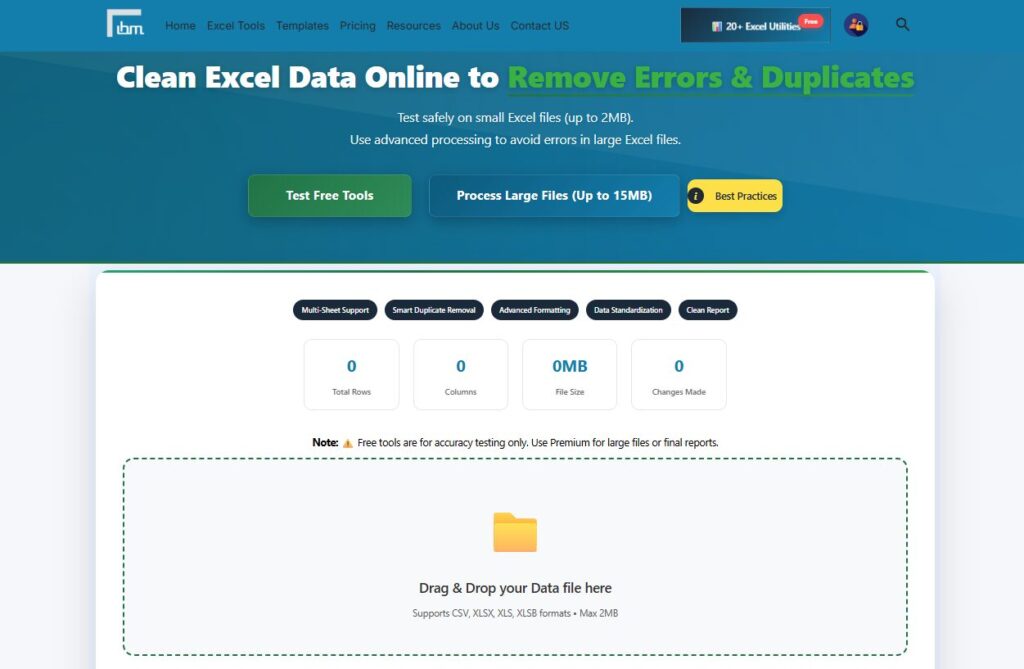
Drag and drop your file directly onto the upload area, or click the Browse Files button to select it from your computer. The tool supports CSV, XLSX, XLS, and XLSB formats. Free version accepts files up to 2MB. Once your file is processed, you will see the total row count, column count, file size, and a confirmation that the file has been successfully loaded.
Step 2 – Select Your Worksheet and Columns
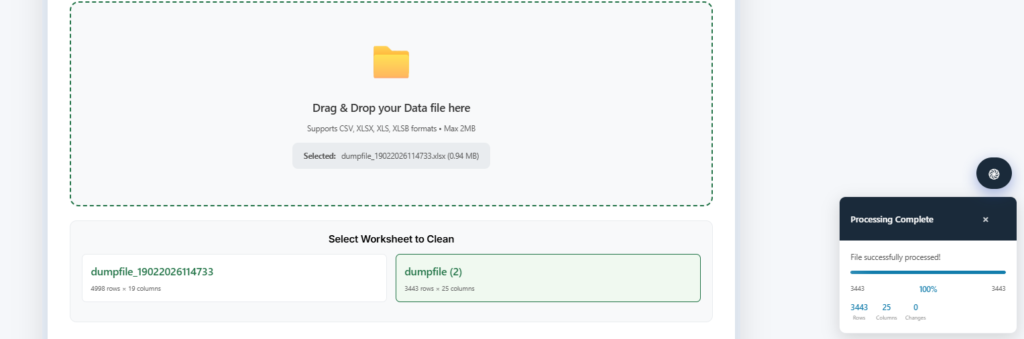
If your file has multiple sheets, select the worksheet you want to clean from the dropdown. Then choose which columns to process – you can select all columns at once or pick specific ones for targeted cleaning.
Step 3 – Choose Your Cleaning Options
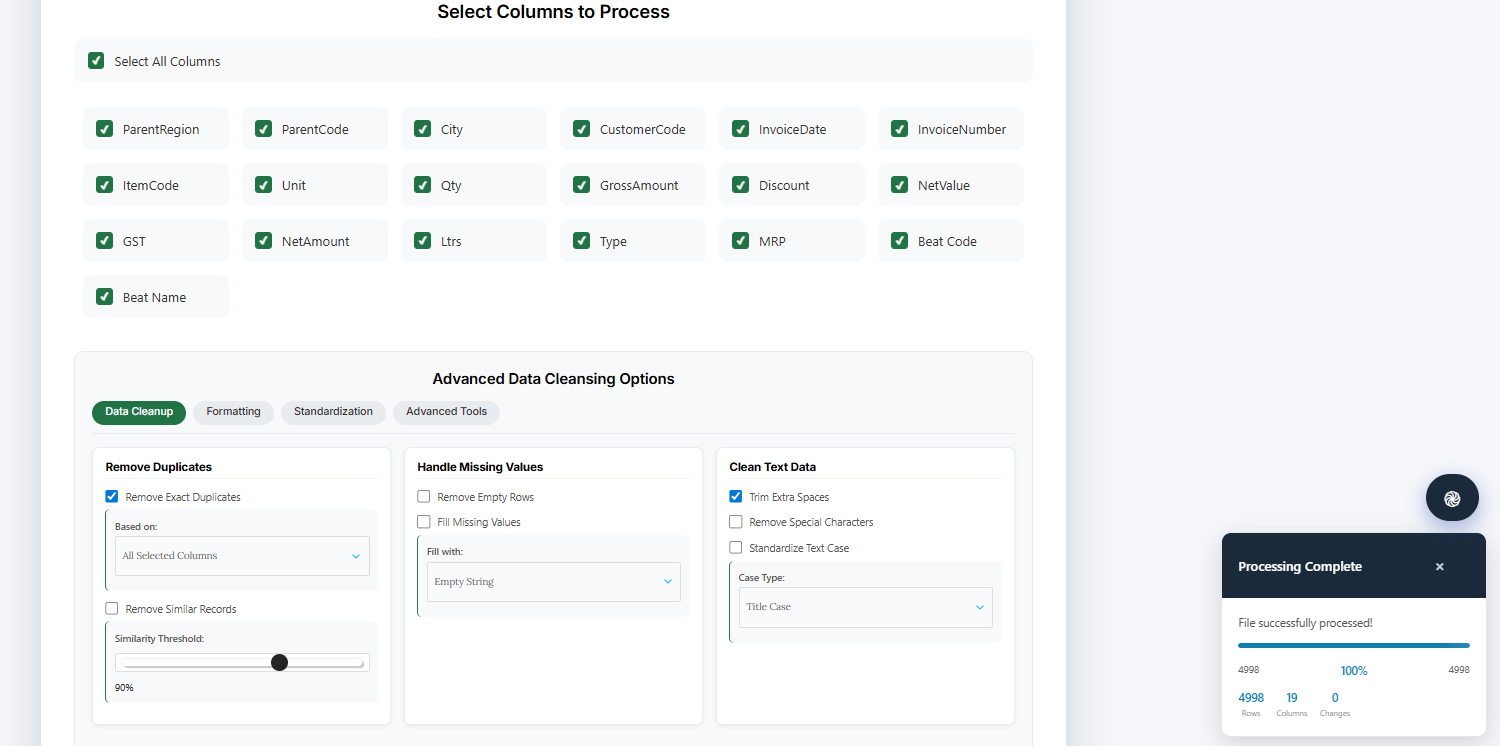
This is where the tool gives you full control. The cleaning options are organized into four tabs:
Data Cleanup Tab
- Remove Exact Duplicates: Based on all selected columns, the first column only, or a custom column selection of your choice
- Remove Similar Records: Uses a similarity threshold – set at 90% by default – to catch near-duplicates that are not exact matches
- Handle Missing Values: Remove empty rows entirely, or fill them with an empty string, zero, column mean, column median, or a custom value you define
- Clean Text Data: Trim extra spaces, remove special characters, and standardize text case to Title Case, UPPER CASE, lower case, or Proper Case
Formatting Tab
- Date Standardization: Convert all date formats to DD/MM/YYYY, MM/DD/YYYY, YYYY-MM-DD, or DD-MMM-YYYY. Extract year, month, day, weekday, or quarter into separate columns
- Number Formatting: Apply currency format, percentage, decimal places, integer, or scientific notation. Round numbers to any decimal place.
Standardization Tab
- Email Standardization: Validate email formats, convert to lowercase, and remove invalid email addresses from your dataset
- Phone Number Standardization: Format phone numbers to International, National, Simple, Dashes, Spaces, or Parentheses format. Validate all numbers automatically
- Address Standardization: Standardize address formats and abbreviate common terms – Street becomes St, Road becomes Rd, Avenue becomes Ave
- Name Standardization: Format personal names as First Last, Last First, or Title Case consistently across your entire column
Advanced Tools Tab
- Data Validation: Validate data against custom rules and detect outliers using IQR Method, Z-Score, or Percentile analysis
- Column Operations: Split columns by comma, space, tab, semicolon, or custom delimiter. Merge multiple columns with a separator of your choice
- Data Transformation: Normalize numerical data using Min-Max Scaling, Z-Score Normalization, or Decimal Scaling. Encode categorical data using One-Hot Encoding, Label Encoding, or Ordinal Encoding
- Custom Transformations: Apply custom JavaScript transformation functions or add new calculated columns using your own formula
Step 4 – Process and Download
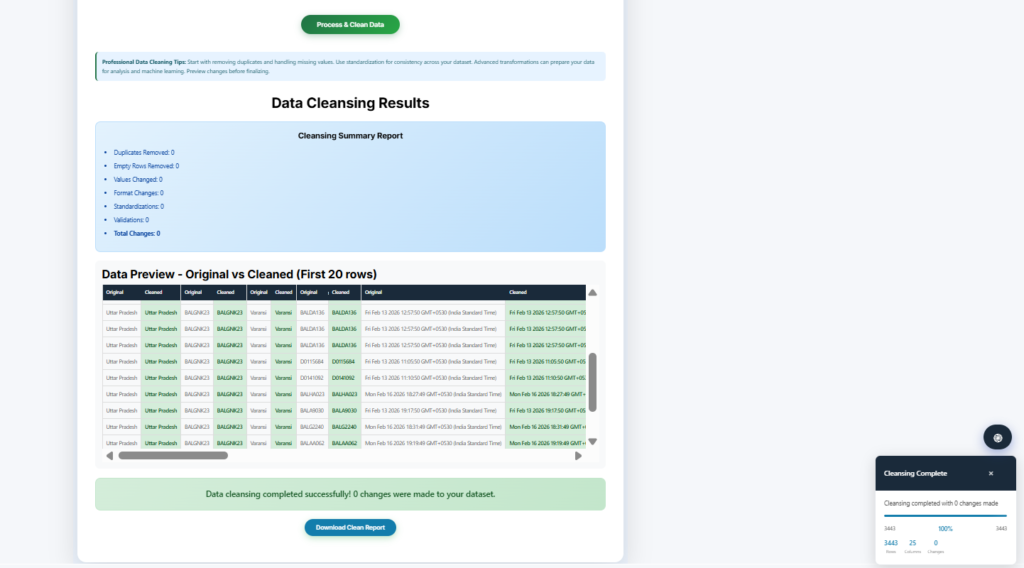
Click the Process and Clean Data button. Your file is cleaned instantly. Download your results as a Clean Excel Report – a formatted spreadsheet showing every change made, along with your cleaned data ready to use.
Who Uses This Excel Data Cleaning Tool?
- HR Teams: Cleaning employee master data before payroll processing – removing duplicate employee IDs, standardizing name formats, fixing blank department fields
- Accountants and Finance Teams: Cleaning transaction data exports from accounting software – removing duplicate entries, standardizing date formats, validating amounts
- Sales and CRM Teams: Cleaning lead and customer lists – removing duplicate contacts, validating email addresses, standardizing phone numbers for calling campaigns
- Data Analysts: Preparing raw datasets for analysis – removing outliers, normalizing numerical columns, encoding categorical variables, handling missing values correctly
- Small Business Owners: Cleaning vendor data, inventory lists, and customer records before reporting or sharing with partners
- Operations and Logistics Teams: Standardizing address data, cleaning delivery records, and removing duplicate shipment entries
Why This Tool Is Different from Excel’s Built-In Cleaning Features
Excel does have some built-in cleaning features – Remove Duplicates under the Data tab, TRIM and CLEAN formulas, Find and Replace, and Text to Columns. But each of these solves only one problem at a time, requires manual setup for every column, and does not handle complex operations like near-duplicate detection, email validation, or data normalization.
Our tool brings all of these operations into a single interface where you configure everything once, apply it to your entire file, and download clean results. It is the difference between spending two hours on manual Excel operations and completing the same work in under five minutes.
And unlike Excel’s Remove Duplicates – which only removes exact matches – our tool also handles near-duplicates using a similarity threshold. A customer named ‘Rajesh Kumar’ and ‘Rajesh Kumar’ (with an extra space) would not be caught by Excel but will be caught here.
Free vs Premium – What Is the Difference?
The free version of the Excel Data Cleaner supports files up to 2MB and gives you full access to all cleaning tabs – Data Cleanup, Formatting, Standardization, and Advanced Tools. It is the complete tool, not a limited trial.
If you regularly work with larger files – full employee databases, large customer lists, complete transaction exports – the Premium plan gives you the capacity to handle them:
- File size up to 15MB
- Access to all 20 premium Excel tools – File Merger, Worksheet Splitter, CSV Converter, Number to Words Converter, and more
- Advanced processing with no limits on operations
- 7-Day Money Back Guarantee – no risk if it does not work for you
Frequently Asked Questions
free Excel Data Cleaner at ibusinessmotivation.com. Select the columns to clean, choose your cleaning options across the four tabs, click Process and Clean Data, and download your clean file. No software installation needed, no signup required for files under 2MB.
Yes. Upload your file to the tool, enable Remove Exact Duplicates or Remove Similar Records in the Data Cleanup tab, and the tool removes them automatically. Your cleaned file downloads as a ready-to-use Excel spreadsheet – without you ever needing to open Excel on your computer.
The tool supports CSV, XLSX, XLS, and XLSB formats. Free version processes files up to 2MB. Premium version processes files up to 15MB.
Your files are processed entirely in your browser. No data is uploaded to or stored on any server. When you close the tab, all file data is cleared. Your business data remains private and secure.
Yes. The Standardization tab includes dedicated options for both. For phone numbers, choose your preferred format – International, National, or Simple – and the tool reformats every number in the column. For emails, the tool validates format, converts to lowercase, and removes any invalid email addresses from your dataset automatically.
Exact duplicate removal deletes rows where every selected column value is identical. Similar record removal uses a similarity threshold – defaulting to 90% – to also catch near-duplicates where values are almost the same but not perfectly identical. This is useful for catching data entry errors, name variations, and formatting differences that exact matching misses.
Conclusion
Dirty data is one of the biggest time thieves in any office. Accountants, HR professionals, data analysts, and operations teams all lose hours every week to manual cleaning work that should take minutes.
Our Excel Data Cleaner brings every cleaning operation you need – duplicate removal, blank cell handling, text standardization, date formatting, email and phone validation, and advanced data transformation – into one browser-based tool that processes your entire file automatically.
Try it free today: https://ibusinessmotivation.com/excel-data-cleaner-free/
Need to process files larger than 2MB or access all 20 premium Excel tools? View Premium Plans – starting at ₹299/month.