



Every accountant, HR professional, and small business owner knows the frustration. You have a spreadsheet full of numbers – invoice amounts, salary figures, cheque payments – and you need each one written out in words. In Indian format. Correctly. Every time.
The standard solution? A complex VBA macro that breaks when you share the file. Or a long nested formula that takes 30 minutes to set up and still gives wrong results for amounts in lakhs and crores.
There is a simpler way. Our free online Number to Words Converter does the entire job in under 60 seconds – no Excel formula, no VBA, no software installation needed. Just upload your file, select your column, and download clean results.
Why Converting Amount to Words in Excel Is So Difficult
Excel does not have a built-in function to convert numbers to words. Microsoft never added one – which means every professional is forced to either write complex VBA code, use a long custom formula, or do it manually row by row.
Each of these approaches has a serious problem:
- VBA macros break when files are shared across different Excel versions or systems
- Custom formulas are long, fragile, and do not support Indian number format – Lakhs and Crores – out of the box.
- Manual typing across 100 or 500 rows creates errors and wastes hours of productive time.
- Third-party add-ins require installation, admin permissions, and sometimes cost money.
How to Convert Amount to Words Online – Step by Step
Our free Number to Words Converter tool works directly in your browser. No download, no login, no waiting.
Step 1 – Upload Your File
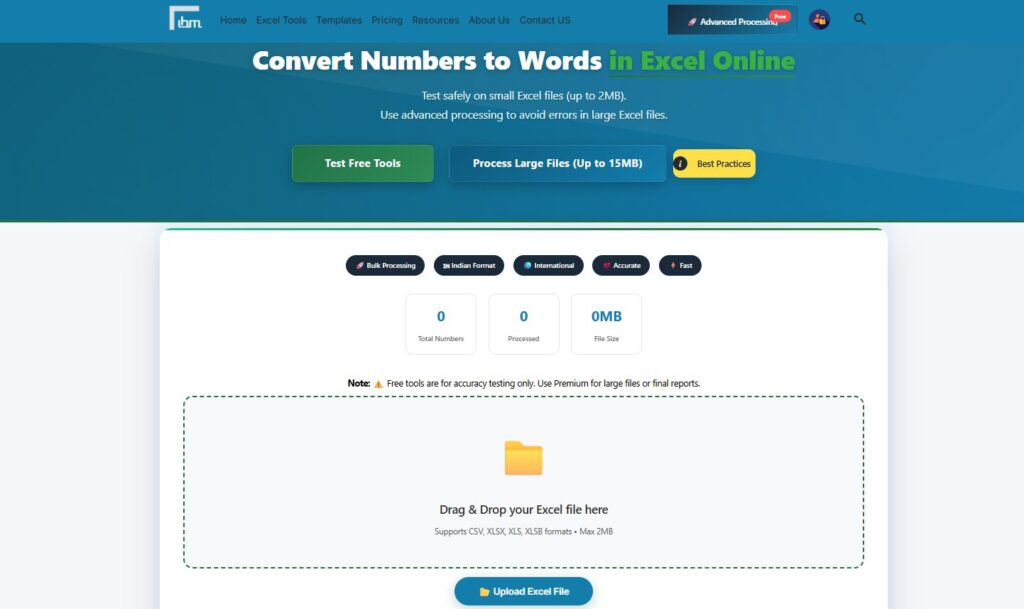
Drag and drop your Excel file onto the tool, or click the upload button to browse your computer. The tool accepts CSV, XLSX, XLS, and XLSB formats. Free version supports files up to 2MB. As soon as your file uploads, you will see the total number of rows detected and a confirmation message: File successfully processed.
Step 2 – Set Your Advanced Conversion Options
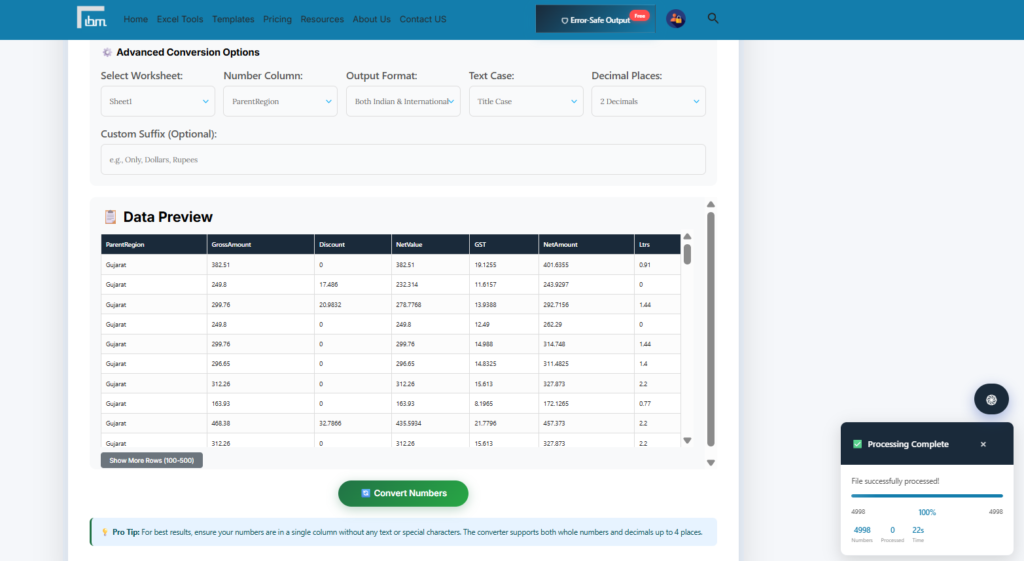
Once your file is uploaded, a full set of conversion controls becomes available. You have complete control over the output:
- Select Worksheet: Choose which sheet in your file contains the data
- Number Column: Pick the exact column that contains the amounts to convert
- Output Format: Choose Indian Format Only, International Format Only, or Both side by side in separate columns
- Text Case: Select Title Case (One Thousand Rupees), UPPERCASE, or lowercase based on your document requirement
- Decimal Places: Control whether decimals appear – No Decimals, 2 Decimal, 3 Decimal, or 4 Decimal
- Custom Suffix: Optionally add a word at the end – Rupees Only, Dollars Only, or any custom text you need
Step 3 – Preview Your Data
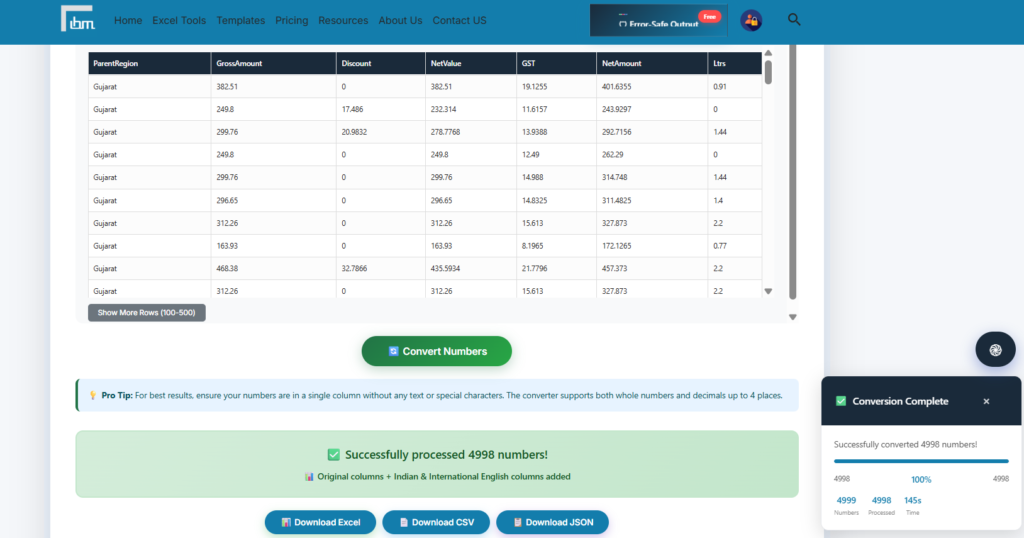
Before converting, the Data Preview section shows you the column structure of your uploaded file. You can see all column names at a glance and confirm you have selected the correct number column. This prevents errors before they happen.
Step 4 – Convert and Download
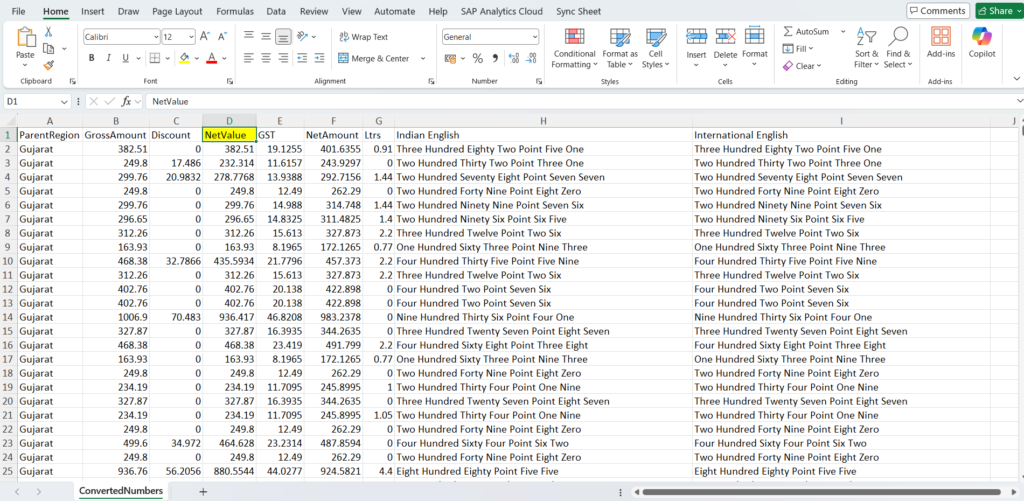
Click the Convert Numbers button. Your file is processed instantly. Three download options appear immediately:
- Download Excel (.xlsx) – formatted spreadsheet ready to use.
- Download CSV – plain text format compatible with any system.
- Download JSON – structured format for developers and automation workflows.
Indian Rupees Amount to Words – Lakhs, Crores, and Paise Supported
Most online number-to-words tools are built for the international number system – Thousands, Millions, Billions. They do not understand Indian number formatting. When you enter 15,00,000 (Fifteen Lakhs), they output Fifteen Hundred Thousand – which is completely wrong for Indian invoices, salary slips, and cheque writing.
Our tool is built with full Indian format support. It correctly handles:
- Lakhs – 1,00,000 outputs One Lakh.
- Crores – 1,00,00,000 outputs One Crore.
- Paise – Decimal amounts like 1250.75 output correctly with Paise.
- Combined – One Crore Twenty Five Lakh Three Thousand Two Hundred Fifty Rupees and Seventy-Five Paise Only.
Who Uses This Tool – Real Use Cases
- Accountants: Writing cheque amounts and financial statements where amounts must appear both in numbers and in words
- HR Professionals: Generating salary slips in bulk where the salary amount must be spelled out in words
- Small Business Owners: Creating invoices and payment receipts where the total amount must appear in words as per legal requirement
- Freelancers: Preparing professional invoices for clients that require amount in words in Indian Rupees format
- Back Office Teams: Processing large batches of financial data where manual conversion is too slow and error-prone
Free vs Premium – What Is the Difference?
The free version of this tool lets you upload files up to 2MB – perfect for testing accuracy and processing smaller datasets. All the core conversion features are available: Indian and International format, all text cases, decimal control, and custom suffix.
If you regularly work with larger files – payroll sheets with thousands of rows, bulk invoice data, or consolidated financial reports – the Premium plan at ₹299 per month or ₹2,999 per year gives you:
- File size up to 15MB.
- Access to all 20 premium Excel tools – Data Cleaner, File Merger, Worksheet Splitter, and more.
- Advanced processing features with no limits.
- 7-Day Money Back Guarantee – no risk, no questions.
Frequently Asked Questions
You do not need VBA at all. Upload your Excel file to our free online Number to Words Converter, select the column containing amounts, choose your format and case preference, and click Convert. Your file downloads in seconds with all amounts converted to words – no macro, no formula, no coding required.
Yes. The free Number to Words Converter at ibusinessmotivation.com is completely free for files up to 2MB. No signup required. No installation needed. Works directly in your browser.
Select Indian Format Only in the Output Format option of the tool. All amounts will be converted using the Indian number system – Lakhs, Crores, and Paise – correctly formatted for invoices, salary slips, and cheque writing in India.
Yes, the tool fully supports the Indian number system. Amounts like 25,50,000 will be correctly converted to Twenty-Five Lakh Fifty Thousand – not Twenty-Five Million Five Hundred Thousand, which is the incorrect international format used by most other tools.
Upload your cheque amount data in an Excel column, select Indian Format Only, choose UPPERCASE for text case, set your decimal option for Paise, and add Rupees Only as your Custom Suffix. The tool will output each amount in the exact format required for cheque writing – for example: TWENTY THOUSAND FIVE HUNDRED Rupees Only.
Your files are processed entirely in your browser. No data is stored on any server. Once you close the browser tab, all uploaded data is gone. Your financial information stays private and secure at all times.
Conclusion
Converting amounts to words in Excel should not take hours or require technical expertise. Whether you are writing ten cheques or processing five hundred salary slips, the right tool makes it a one-minute task.
Our free Number to Words Converter gives you full control – Indian and International formats, all text cases, decimal precision, and custom suffixes – in a clean, browser-based tool that works instantly without any setup.
Try it free today: https://ibusinessmotivation.com/number-to-words-converter-free/
Need to process larger files or access all 20 premium Excel tools? View Premium Plans – starting at ₹299/month.