


If you work with APIs, web applications, databases, or data pipelines, you already know the problem. Your data is sitting in an Excel spreadsheet. Your application needs JSON. And every time this happens, you are either writing a script from scratch, copying data manually, or searching for a tool that actually works the way you need it to.
Most Excel to JSON converters online are too basic – they convert the first sheet only, strip your headers, ignore column selection, and give you a flat output you still have to reshape. That costs time you do not have.
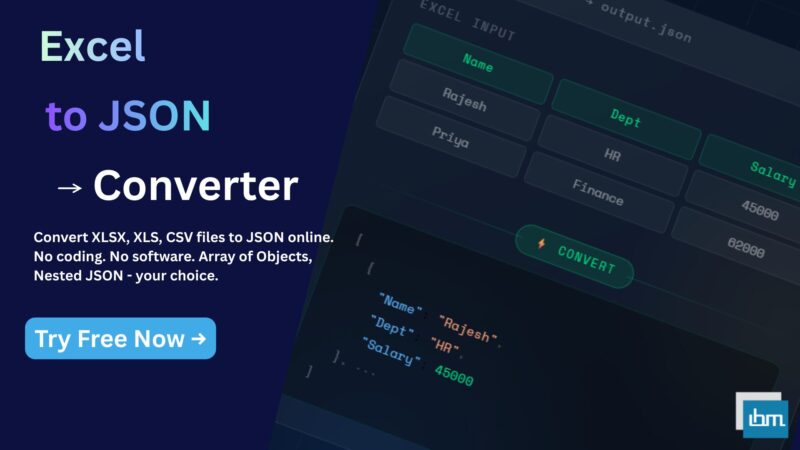
Our free Excel to JSON Converter gives you full control over the output structure – choose your worksheet, select specific columns, pick your JSON format, and download a clean, ready-to-use JSON file in seconds. No software. No coding. No server upload.
Why Most Excel to JSON Converters Fall Short
There are dozens of free Excel to JSON tools available online. The problem is that most of them were built for simple use cases – one sheet, one format, no customization. When you are building an API payload, preparing data for a NoSQL database, or feeding data into a JavaScript application, those tools become a bottleneck instead of a solution.
Here is what most basic tools cannot do:
- Let you select which worksheet to convert from a multi-sheet workbook
- Allow you to choose specific columns to include – or exclude – from the output
- Give you a choice of JSON structure – Array of Objects, Array of Arrays, or Nested Objects
- Show you a live preview of both the table and the JSON output before you download
- Support all major Excel formats – XLSX, XLS, XLSB, and CSV – in a single tool
How to Convert Excel to JSON Online – Step by Step
The entire process takes under 60 seconds. Here is exactly how it works.
Step 1 – Upload Your Excel File
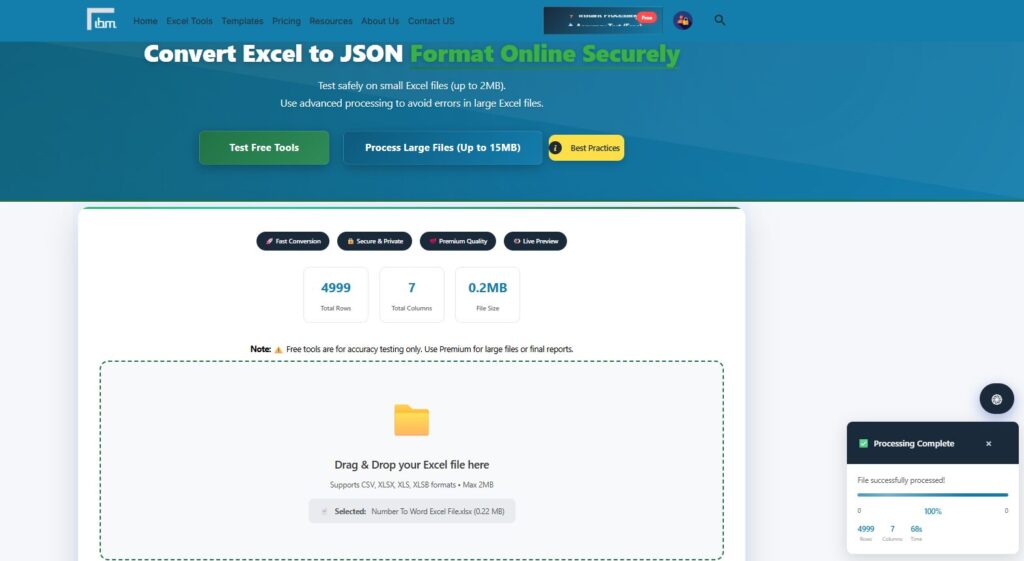
Drag and drop your file directly onto the tool, or click the browse button to select it from your computer. The tool supports CSV, XLSX, XLS, and XLSB formats – no conversion needed before upload. Free version processes files up to 2MB. Once your file is uploaded, the tool instantly reads the structure and displays your total row count, column count, and file size in the summary panel.
Step 2 – Configure Your Advanced Conversion Options
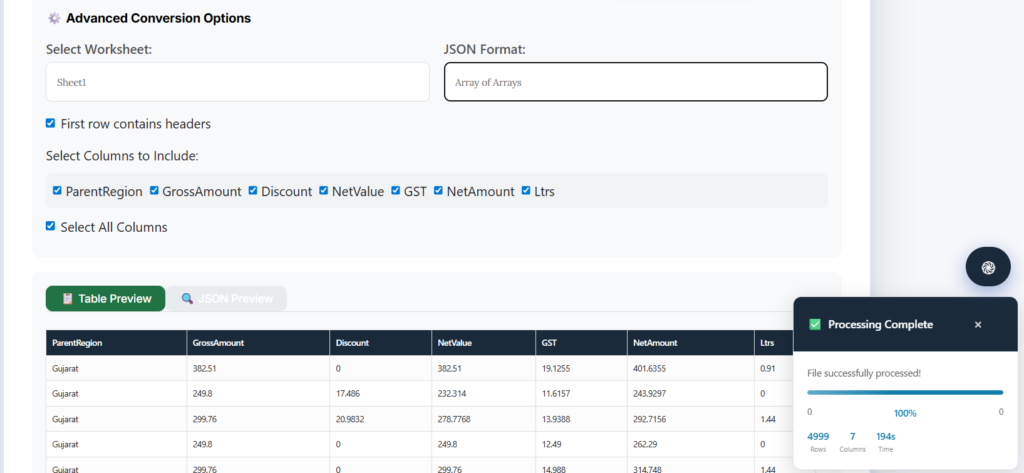
This is where our tool separates itself from basic converters. Once your file loads, you get a full set of controls:
- Select Worksheet: If your Excel file has multiple sheets, choose exactly which worksheet you want to convert
- JSON Format: Choose from three output structures – Array of Arrays, Array of Objects, or Nested Objects
- First Row as Headers: Toggle this on to use your first row as property keys in the JSON output – ideal for structured data with column names
- Select Columns to Include: Choose only the columns you need. If your sheet has 20 columns but your JSON only needs 5, you can include exactly those 5 – keeping your output clean and lightweight
Step 3 – Preview Your Output Before Downloading
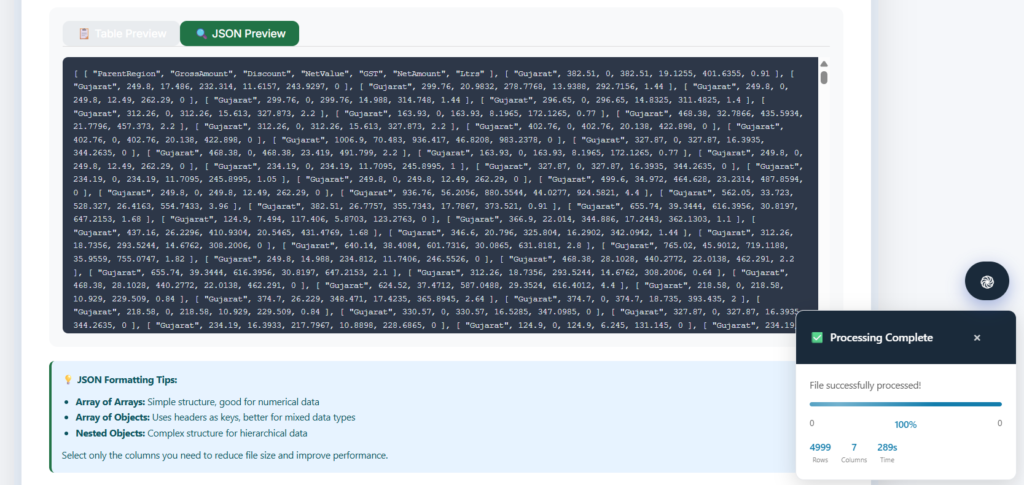
Before downloading anything, the tool gives you two live preview panels – a Table Preview showing your data in spreadsheet form, and a JSON Preview showing the exact JSON structure you will get. This means no surprises when you open the downloaded file. You see exactly what you are getting before you commit.
Step 4 – Download Your JSON File

Once you are satisfied with the preview, click the download button and your JSON file is ready instantly. The output is clean, properly formatted, and ready to use in any application, API, or database system without further editing.
Which JSON Format Should You Choose?
This is the most important decision in the conversion process. Our tool offers three output formats and each one is suited to a different use case.
Array of Objects – Best for Most API Use Cases
Each row in your Excel sheet becomes a JSON object, and each column header becomes a key. This is the most readable format and the one most APIs and web applications expect. If your Excel has a header row and you are sending data to a REST API, a JavaScript app, or a MongoDB collection, this is the format you want.
Array of Arrays – Best for Numerical and Matrix Data
Each row becomes a simple array of values, without any property keys. This is a compact format ideal for numerical datasets, matrix data, or when you are passing data to a charting library or a Python script where column names are handled separately.
Nested Objects – Best for Hierarchical Data Structures
This format creates a more complex JSON structure with parent-child relationships. It is most useful when your data has a natural hierarchy – for example, product categories with subcategories, or departments with employee records – and you need the JSON to reflect that structure for a frontend application or a document database.
Who Uses This Tool – Real Use Cases
- Developers: Converting sample data from Excel into JSON for API testing, mock data generation, or seeding a development database
- Data Analysts: Exporting processed Excel data into JSON for use in Python scripts, data visualization tools, or BI platforms that accept JSON feeds
- Backend Engineers: Preparing static JSON data files from Excel-based content – product catalogs, configuration tables, lookup data – for use in web applications
- No-Code and Low-Code Users: Converting business data from Excel into JSON format required by tools like Airtable, Zapier, Make, or Webflow CMS
- Freelancers and Consultants: Delivering data to clients in JSON format when the client’s system requires it but the source data is always in Excel
Is Your Data Safe? – Yes, 100%
Data security is a legitimate concern when using online file conversion tools – especially if your Excel files contain business data, financial records, or personally identifiable information.
Our tool processes your file entirely inside your browser. Your Excel file is never sent to any server. The conversion happens locally on your machine using browser-side processing, which means your data never leaves your computer at any point during or after the conversion.
Once you close the browser tab, all file data is completely gone. Nothing is stored, logged, or retained. You can safely use this tool with sensitive business or financial data.
Free vs Premium – What Is the Difference?
The free version handles files up to 2MB – which covers most standard Excel datasets used in development, testing, and everyday data work. All conversion features including worksheet selection, JSON format choice, column filtering, and live preview are fully available in the free version.
If you regularly work with larger Excel files – product catalogs with thousands of SKUs, large data exports from ERPs, or bulk database records – Premium gives you:
- File size up to 15MB for large-scale conversions
- Access to all 20 premium Excel tools – Data Cleaner, File Merger, Worksheet Splitter, CSV Converter, and more
- Advanced processing with no daily limits
- 7-Day Money Back Guarantee – zero risk on your first subscription
Frequently Asked Questions
Upload your Excel file to our free Excel to JSON Converter, select your worksheet and JSON format, preview the output, and download your JSON file. No login, no installation, no coding required. Free for files up to 2MB.
Yes. Our tool processes your file entirely inside your browser – nothing is sent to any external server. Your XLSX file stays on your computer throughout the entire conversion process. This makes it safe to use with sensitive or confidential business data.
Array of Objects uses your column headers as property keys – each row becomes a named object like { Name: John, Age: 30 }. This is the standard format for APIs and web applications. Array of Arrays converts each row into a simple list of values like [ John, 30 ] – better for numerical data or when headers are handled separately by the receiving application.
Yes. When you upload a multi-sheet Excel workbook, the tool detects all available worksheets and lets you select exactly which sheet to convert. You are not limited to the first sheet only – a major limitation of most other free converters.
Yes. After uploading your file, the Select Columns panel shows all columns in your sheet. You can check or uncheck individual columns, or use the Select All option. Only the columns you select will appear in your downloaded JSON – keeping your output clean and precisely structured.
The tool supports XLSX, XLS, XLSB, and CSV formats. You can upload any of these file types directly without converting them first. The tool reads the structure automatically regardless of format.
Conclusion
Converting Excel to JSON should not require a Python script, a VBA macro, or a paid subscription to an enterprise tool. Whether you are a developer preparing API test data, an analyst exporting processed data, or a business user feeding data into a no-code platform, the right tool makes it a one-minute task.
Our free Excel to JSON Converter gives you complete control – worksheet selection, JSON format choice, column filtering, live preview, and secure browser-based processing – all without any software installation or account creation.
Try it free today: https://ibusinessmotivation.com/excel-to-json-converter-free/
Need to convert larger files or access all 20 premium Excel tools? View Premium Plans – starting at ₹299/month with 7-Day Money Back Guarantee.